KEP-Software
Knowledge and Expertise is Powerful

In what are you interested?
Introduction
FAQ section
With the help of a CMS (Content Management System), what I call the Smart App, a Frequently Asked Question section can be generated without knowledge of HTML and CSS. Specific to this solution is a decision tree which can help to interactively get to an answer.
FAQ group
Each main item in the frequently asked question is called a group, having a title, optional introduction and a list of FAQ-items to include.
FAQ item
A FAQ-Item holds the information of a single question. It can be included under a FAQ-group or used within a decission tree. The item holds a title, introduction text and a optional button. In case it is a trouble shooting item one can define a symptom, cause and solution. It can also define parts of the next decission tree to show.
Decision tree
The decission tree is built from FAQ-Items which have sub-oridnate FAQ-items assigned (a maximum of 6 per item). A FAQ-item defined as start question and included in a FAQ-group will render the decission tree. The additional information is shown upon selection of an item as well as sub items (if any).
Design
The underlying software is the Smart App which can be configured to store objects. In case of the FAQ those are FAQ-groups and FAQ-items. The software is written using Python, Flask an Jinja2 templates generating HTML, CSS and Javascript. It runs under Apache modwsgi. The database being used is MongoDB which allows for flexible DataSchemes in theory it can be programmed to store different objects. The application is multi user and each user can have multiple accounts (layout of the dataset) assigned. For the FAQ creation there are two data sets. The one in which can be edited. And a public one which holds a snapshot of the editable dataset and generates a user friendly output like the one you are currently reading.
Message Diagrams
Interactively created Message Diagrams are generated based on knowledge/programmed logic. They are not statically created Diagrams as done by most common tools. The system gives a choice whenever the logic comes up with more than one option. The user then has to select an option, causing the system to continue on the given path until the next choice arrives. Choices are given until no more choices are available for chosen path. By doing this the user interactively generates the Message Diagram. This approach creates a virtually unlimited amount of permutations in generated Message Diagrams.
More information on Message DiagramsBanking - Product Knowledge Base
This knowledge base represents a simplified banking environment. It simulates the interaction between customers and the bank. The customer represent a real customer but also a web-shop or merchant are customers of the bank.
Learn more about the Banking exampleTransfer Saving funds
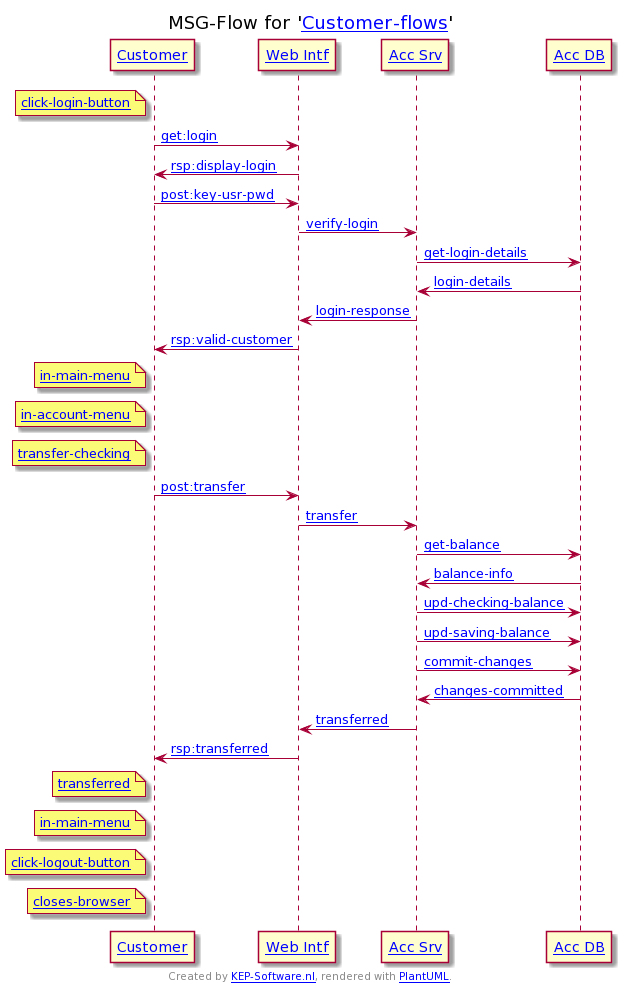
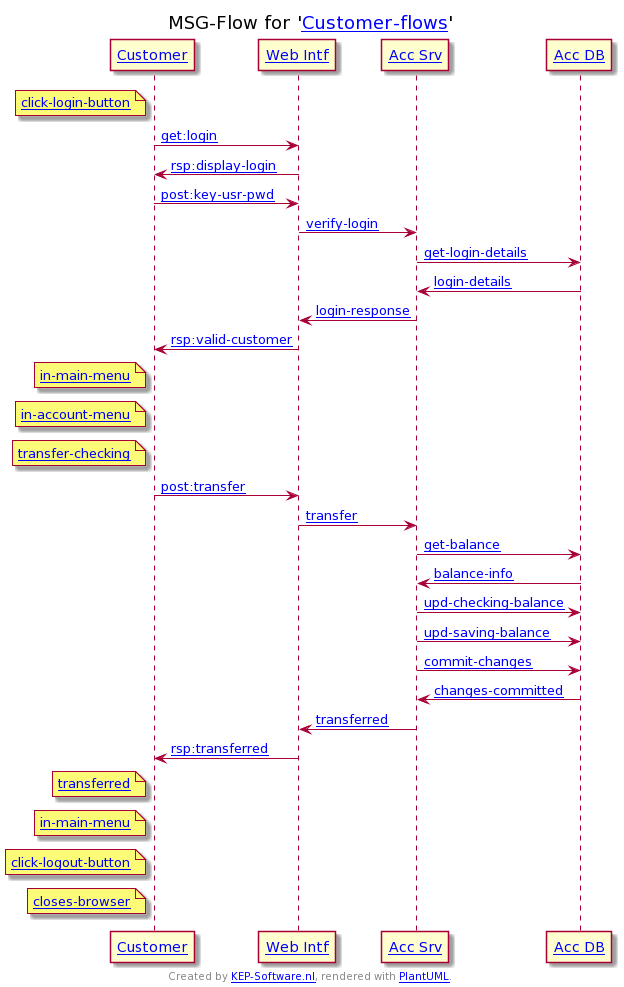
The customer wants to transfer money from his checking account to his savings account. He does this via an internet banking session, where he needs to login using his password/pin...
Goto Example - Transfer Saving fundsATM Withdrawal
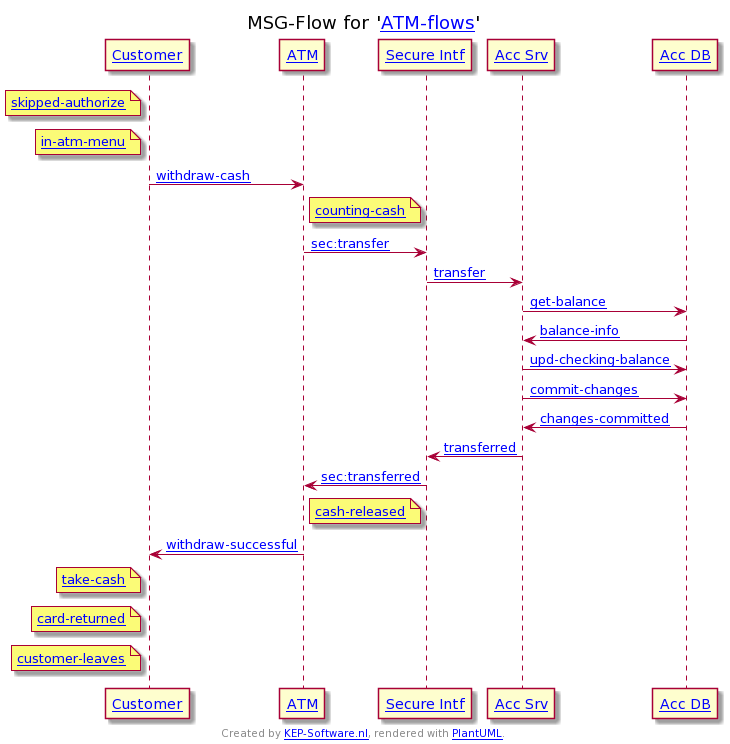
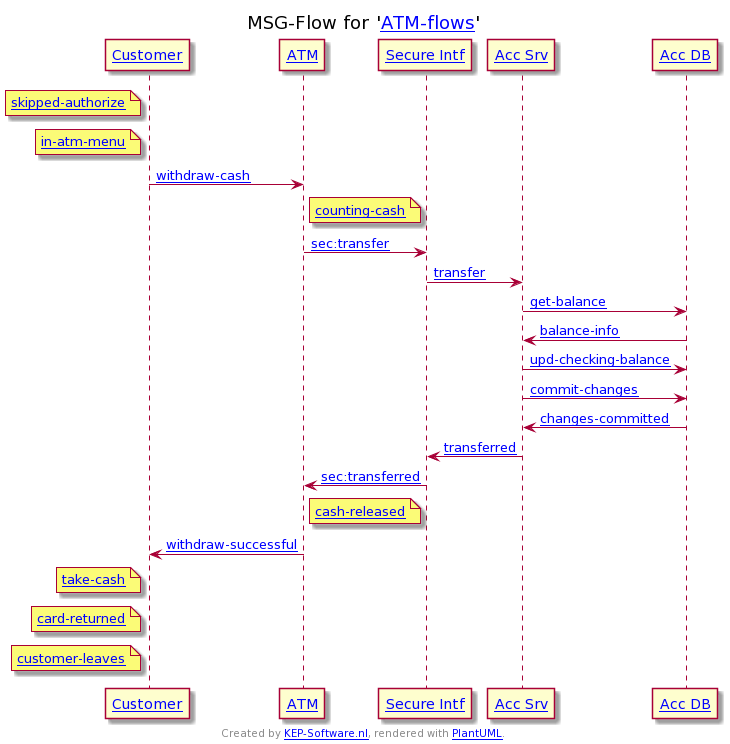
The customer wants to withdraw money using an ATM. In this case it was chosen to skip the authorization (to simplify the diagram), the cash counted and the checking account is debited...
Goto Example - Customer withdraws money from ATMMerchant Contactless
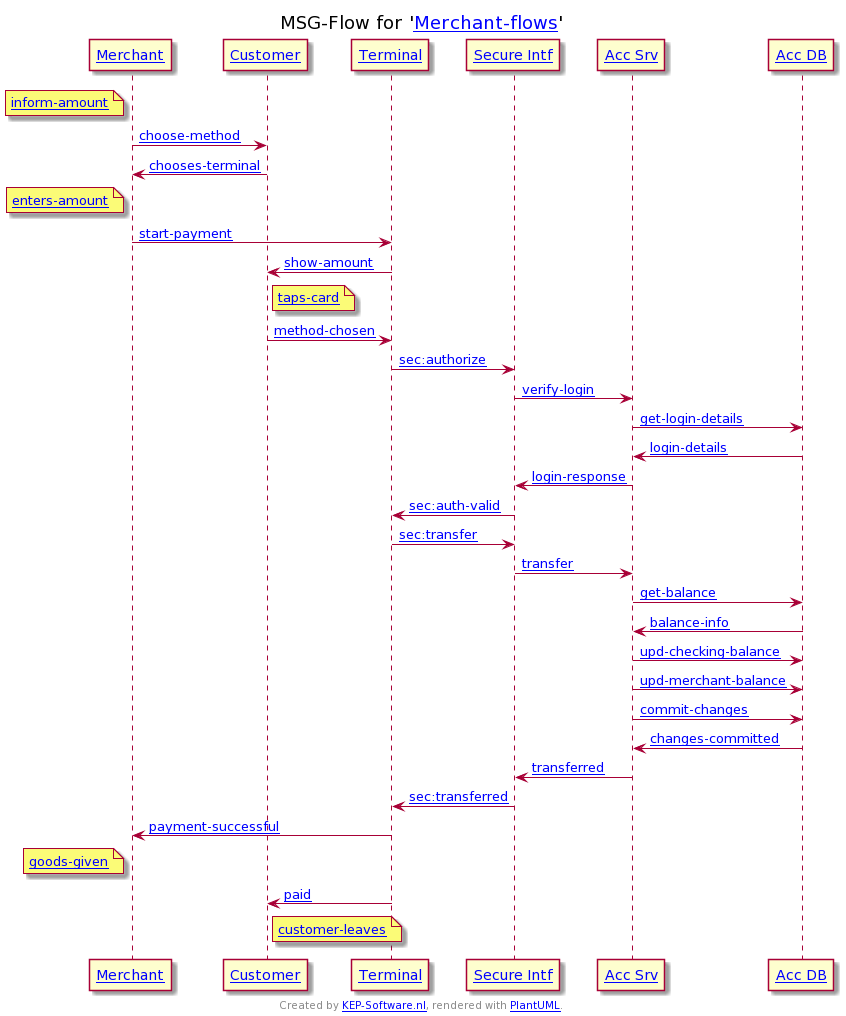
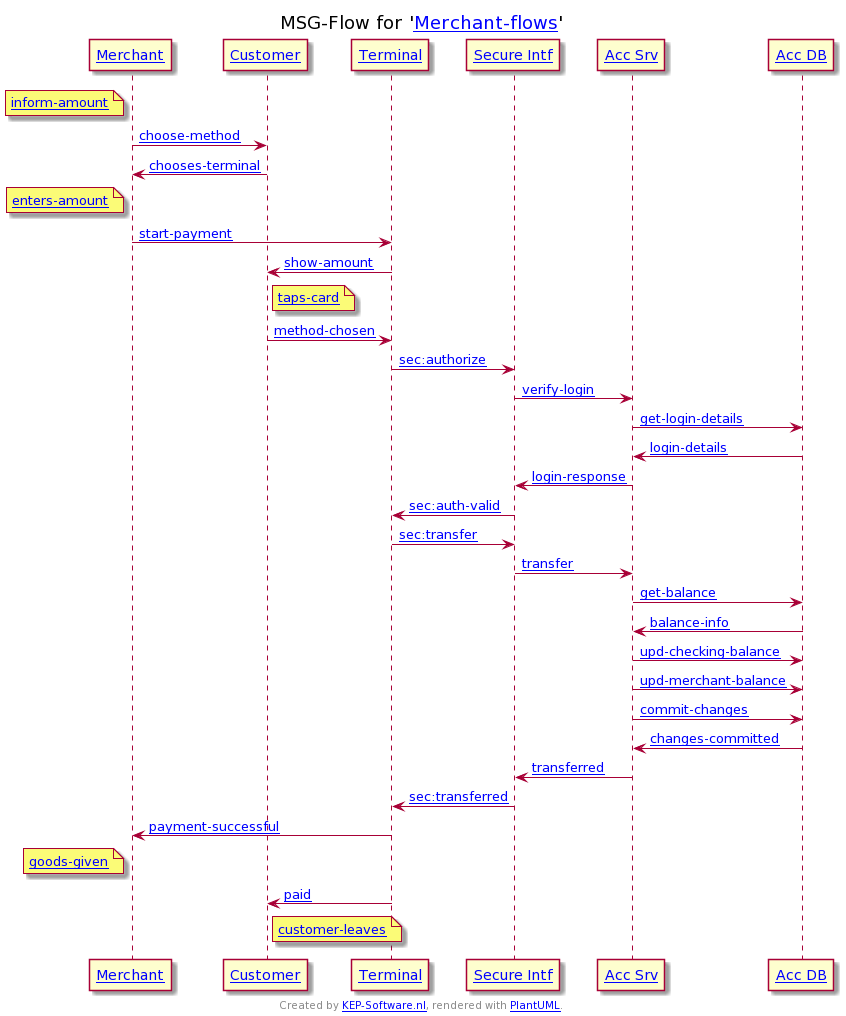
The customer needs to pay the merchant for the goods. The customer decide to pay with an electronic payment method. If it was cash then the diagram would have been easy. There are 3 electronic payment method available, in this case contact-less is chosen. The customer taps his card which is validated correctly and the money is transferred to merchants account as he has enough balance...
Goto Example - Merchant starts contact-less paymentWebshop iDEAL
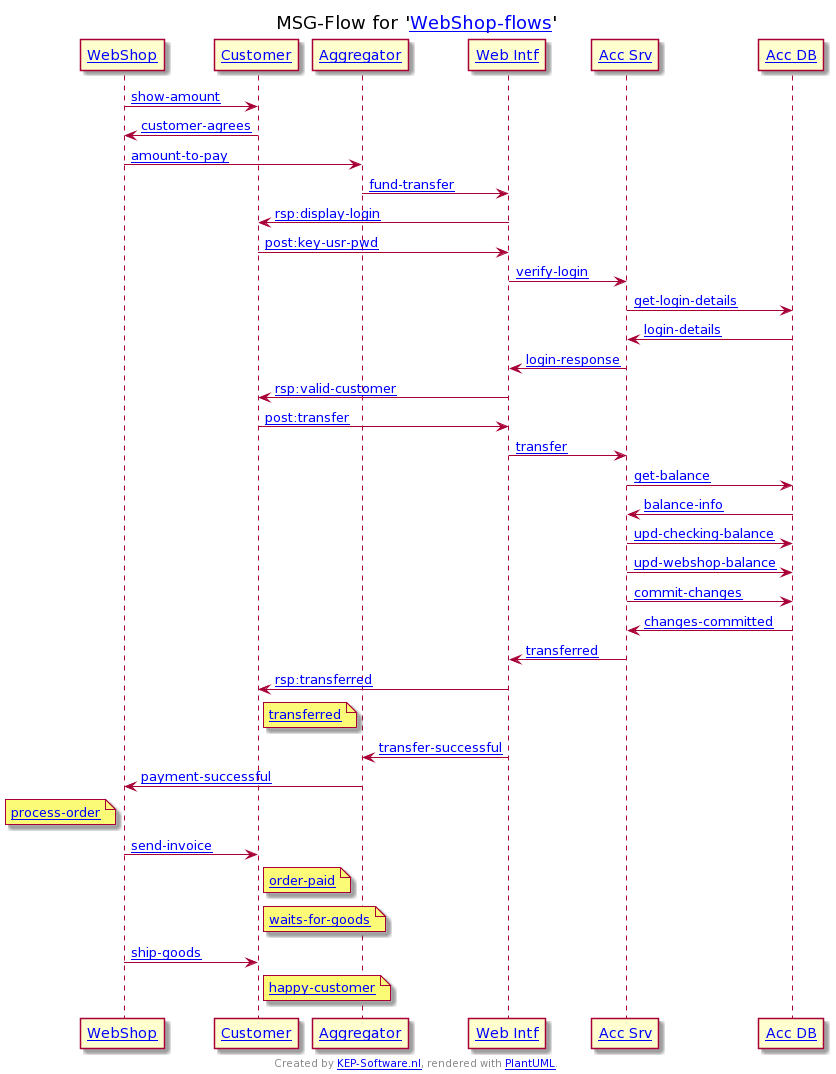
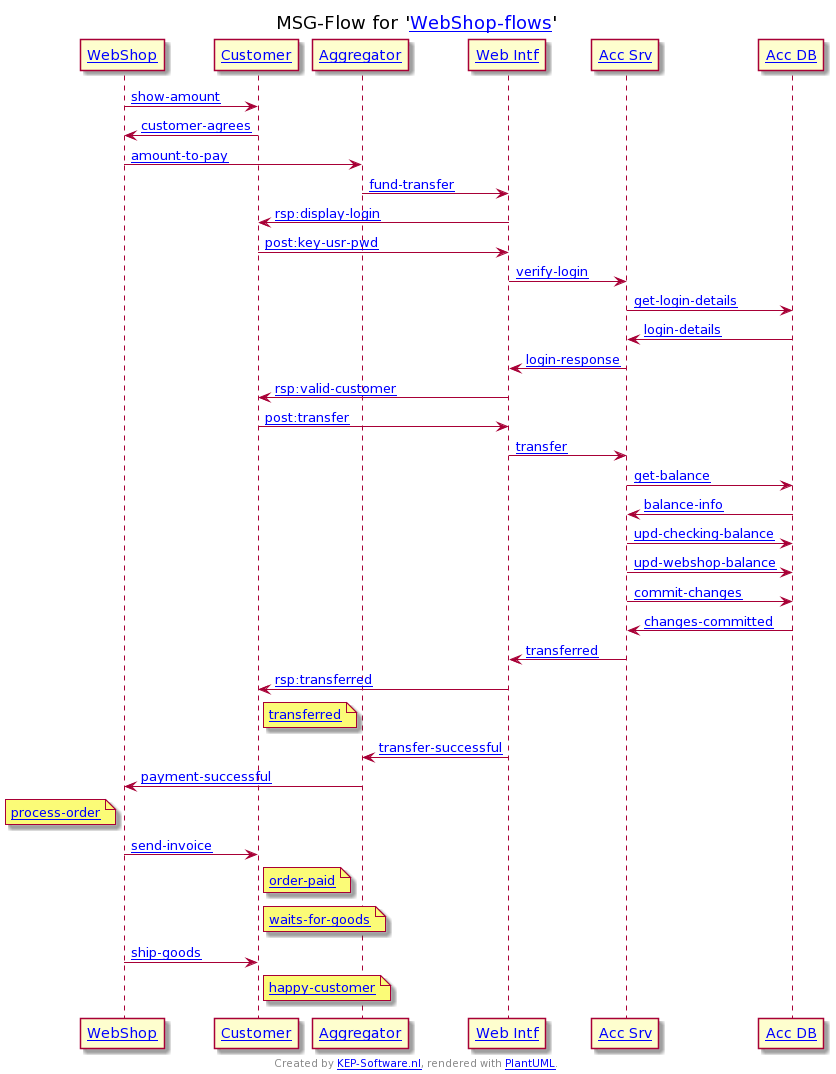
The customer want to buy something in a web-shop. The total amount to pay is shown and the customer is send has several choices on how to pay. In this case a iDEAL (a direct banking payment method) is chosen. The customer enter a valid password. The balance check passed and the the money is transferred to the web-shop owner...
Goto Example - Web-Shop payment using iDEALCreate your own flow
With the button below you can start creating your own flow. Select a starting point from the given overview...
Lets start creating your own flowSimple SMSC - Product Knowledge Base
This knowledge base represents a small SMSC. It simulates the interaction between the SMSC and its external parties being the Applications and the User Equipment. It does not simulate the extensive other elements.
Learn more about the SMSC exampleSuccessful UCP submit
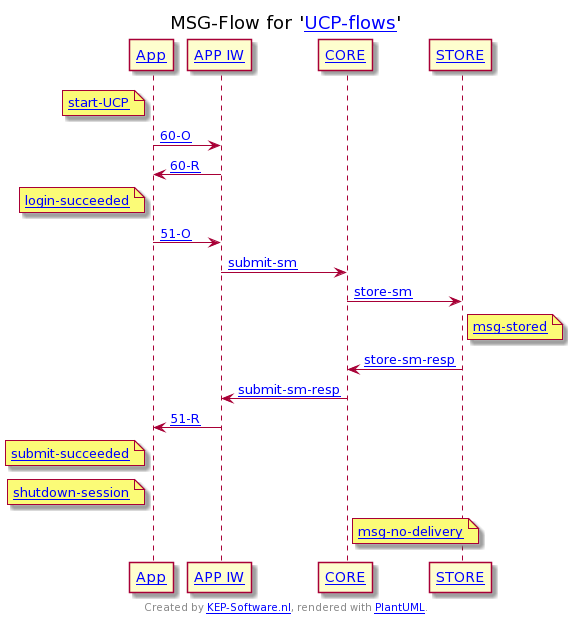
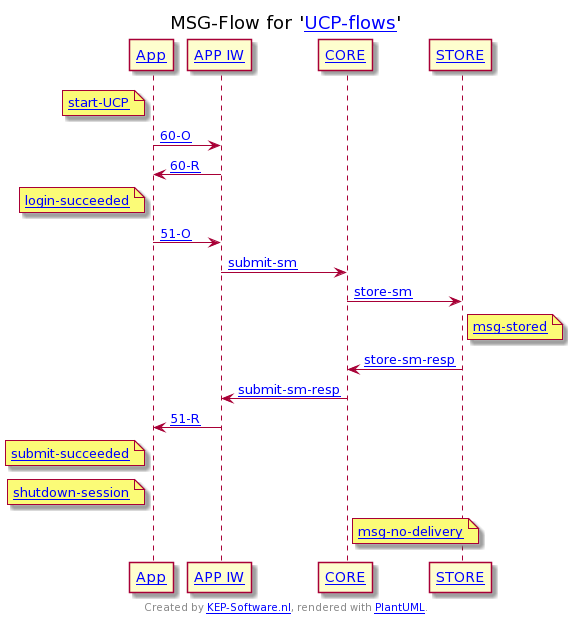
An Application (e.g. password validation) want to send to a mobile user. In this case its done using an UCP application which has to identify itself. This succeeded first time, it than submit a message is send after the message is successfully stored
Goto Example - Successful UCP submitSMPP App to SS7 Mobile
An Application (e.g. 2way password validation) want to send to a mobile user. In this case its done using an SMPP application which has to identify itself. This succeeded first time, it than submit a message is send after the message is successfully stored...
Goto Example - SMPP App to SS7 MobileSuccessful Mo-Mt (SS7)
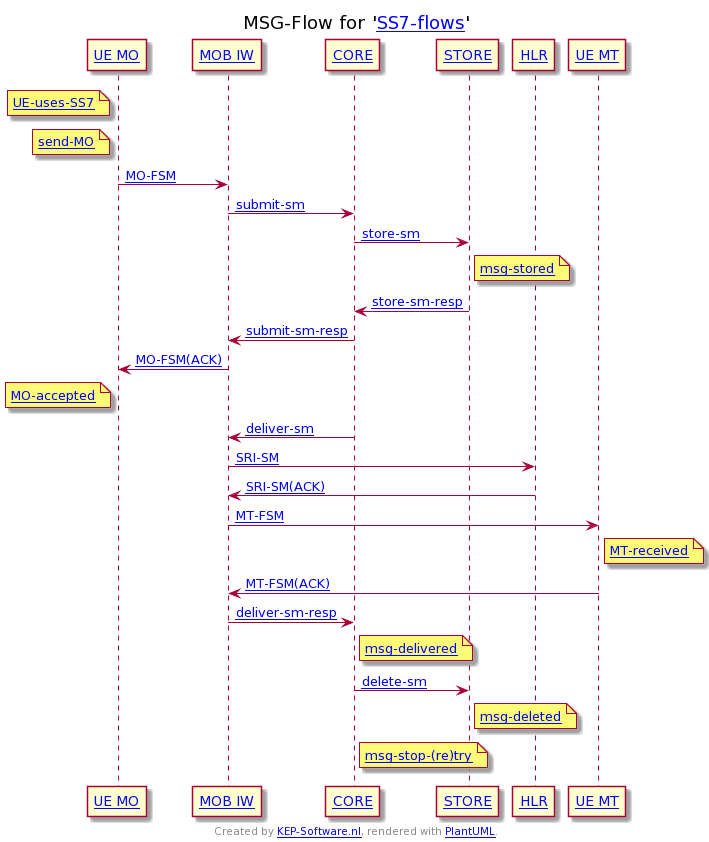
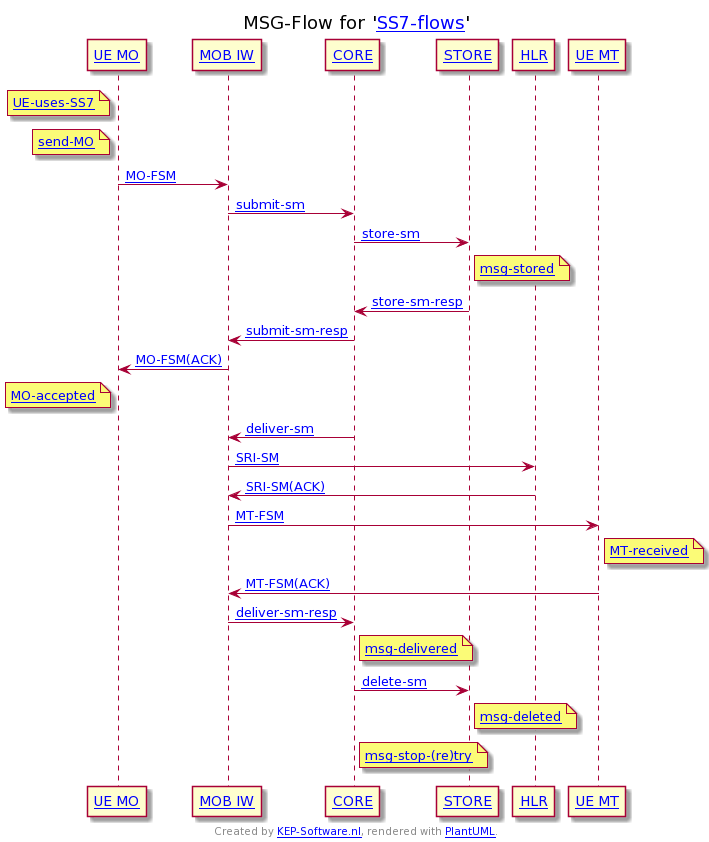
A mobile user uses SS7 to send a short message. The core accept the message and it is successfully stored. The response is send to the originator. In the mean time a delivery attempt is started to a mobile recipient...
Goto Example - Successful Mobile to Mobile over SS7Mt SS7 then SIP
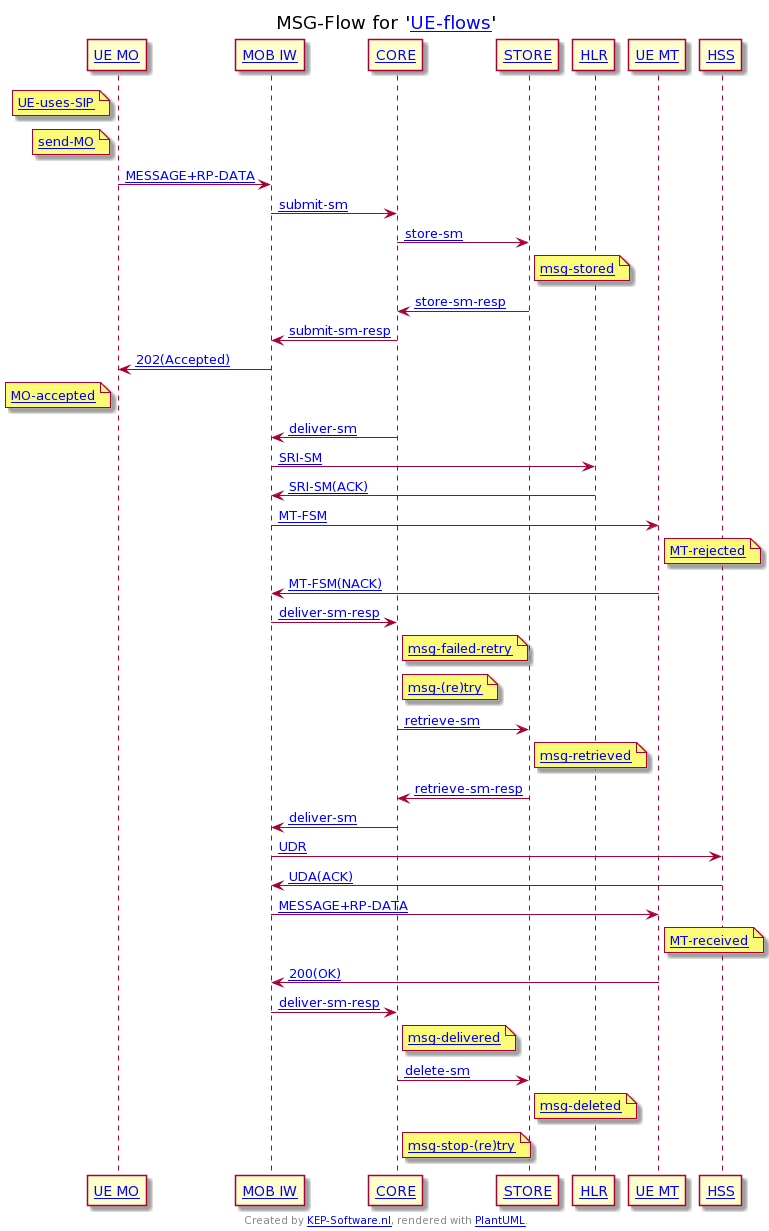
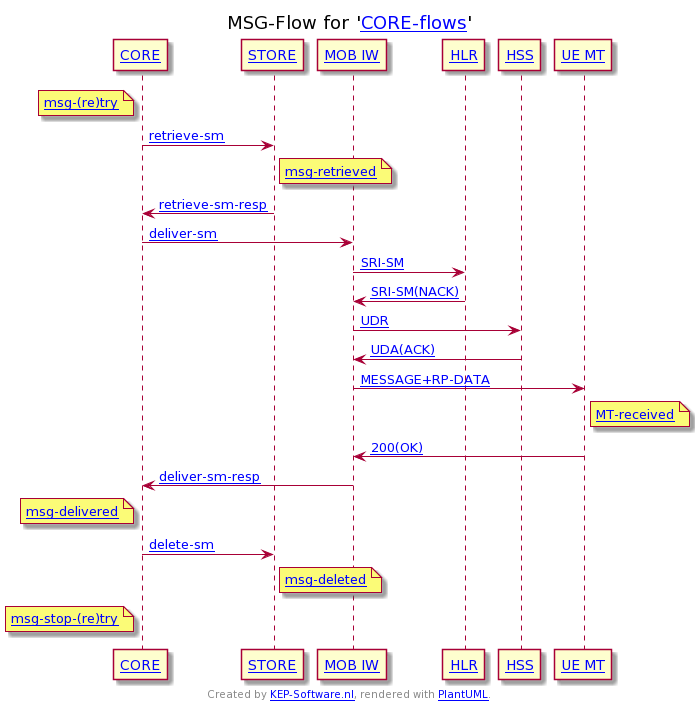
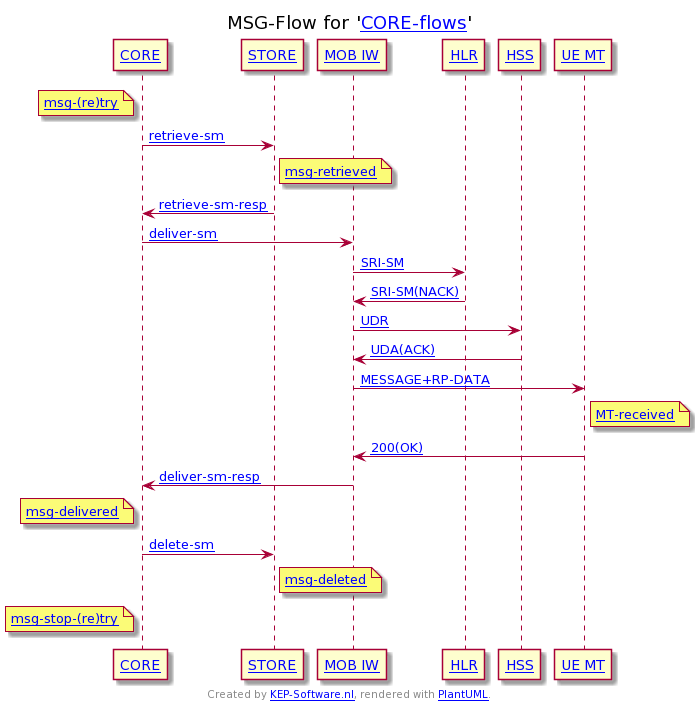
The core starts a delivery attempt towards a mobile. First SS7 is attempted but the HLR (SS7 domain) gives a negative response. Then the HSS (SIP domain) is tried, which answers with a positive reponse. The delivery attempt is done over SIP and the mobile accepts the message...
Goto Example - Core retries to Mobile, first SS7 than SIPMo-Mt retry
The mobile user using SIP want to send a message to another mobile, the message is successfully accepted by the SMSC. A delivery attempted towards a mobile. First SS7 is attempted the HLR (SS7 domain) thinks is in its domain. Then a delivery attempt is tried to the mobile over SS7...
Goto Example - Mobile to Mobile, retry deliveryCreate your own flow
With the button below you can start creating your own flow. Select a starting point from the given overview...
Lets start creating your own flowUnix Services - Product Knowledge Base
This Knowledge base represents a minimal subset of services available on an Unix server. Other operating systems will have similar message flows, but might have different entities involved.
Learn more about the Unix Services exampleTelnet no Listener
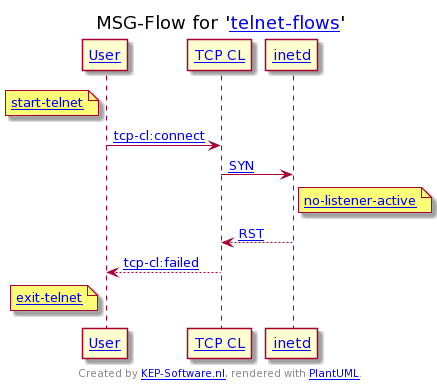
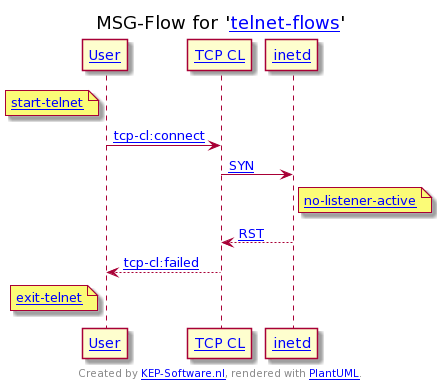
The user start a telnet session. His session is rejected as there is no listener active. This happens when the used service (in this case telnet) is not configured or started...
Goto Example - Telnet no ListenerTelnet Login
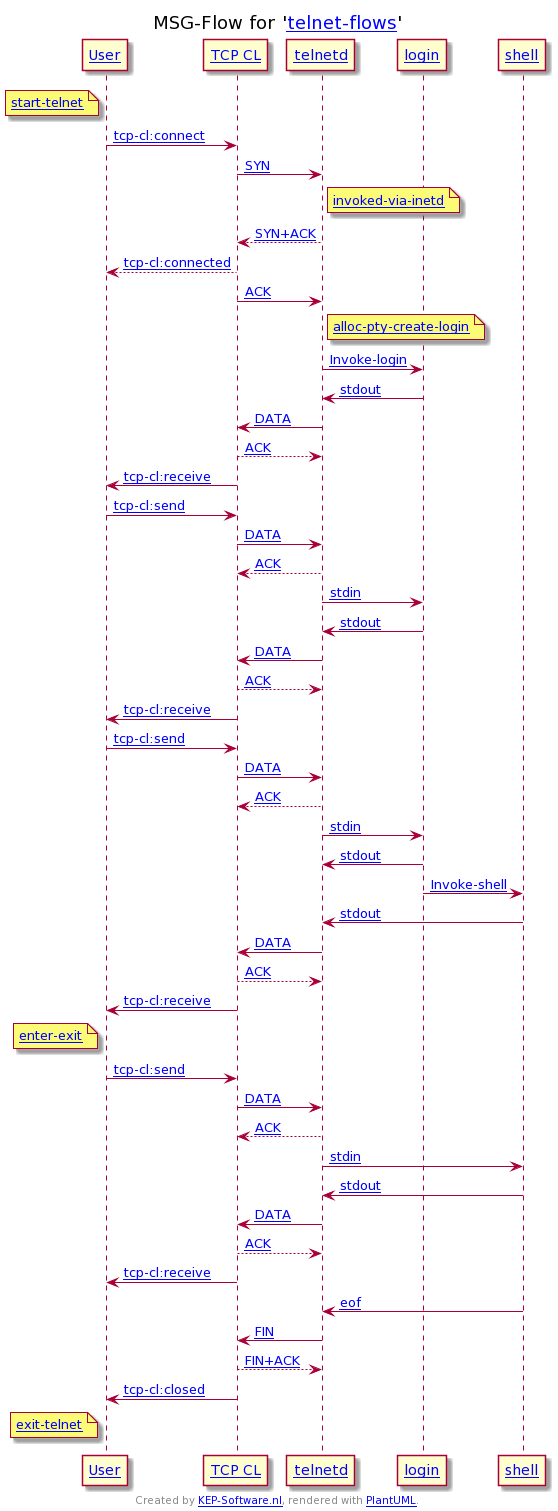
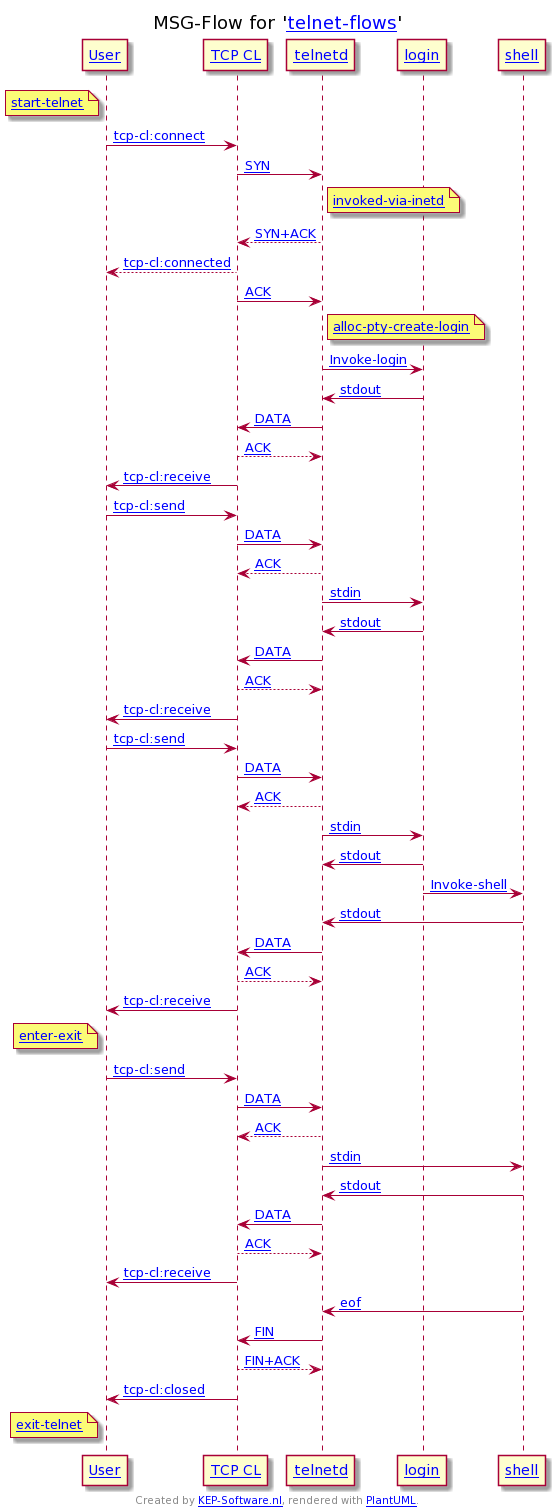
The user start a telnet session. His session is accepted by the inet daemon and passed on to login process. The user send a correct password on the first attempt. The session is then handed over to the shell process which can handle the command...
Goto Example - Telnet LoginCreate your own flow (global view)
With the button below you can start creating your own flow. Select a starting point from the global overview...
Lets start creating your own flowCreate your own flow (detailed view)
With the button below you can start creating your own flow. Select a starting point from the detailed overview...
Lets start creating your own flowVersatile - Product Knowledge Base
This knowledge base represents some versatile diagrams. More will be added in the future. The flow and enitties do not have (much) relation to each other. The message are mainly in human readable form and do not represent real computer messages or protocols.
Learn more about the Versatile examplePassenger Boards Airplane
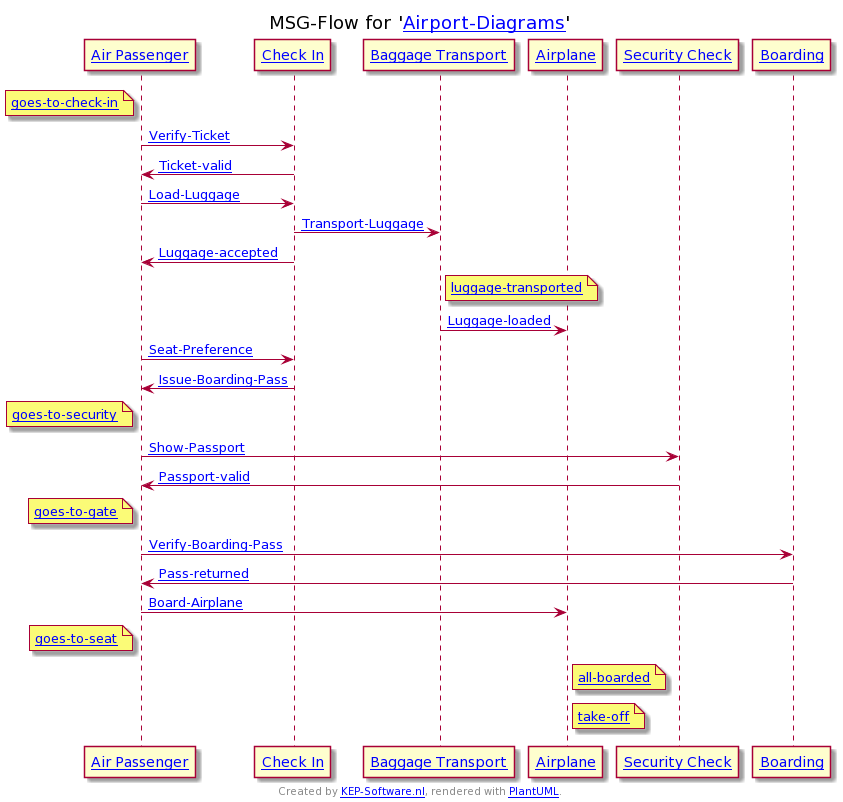
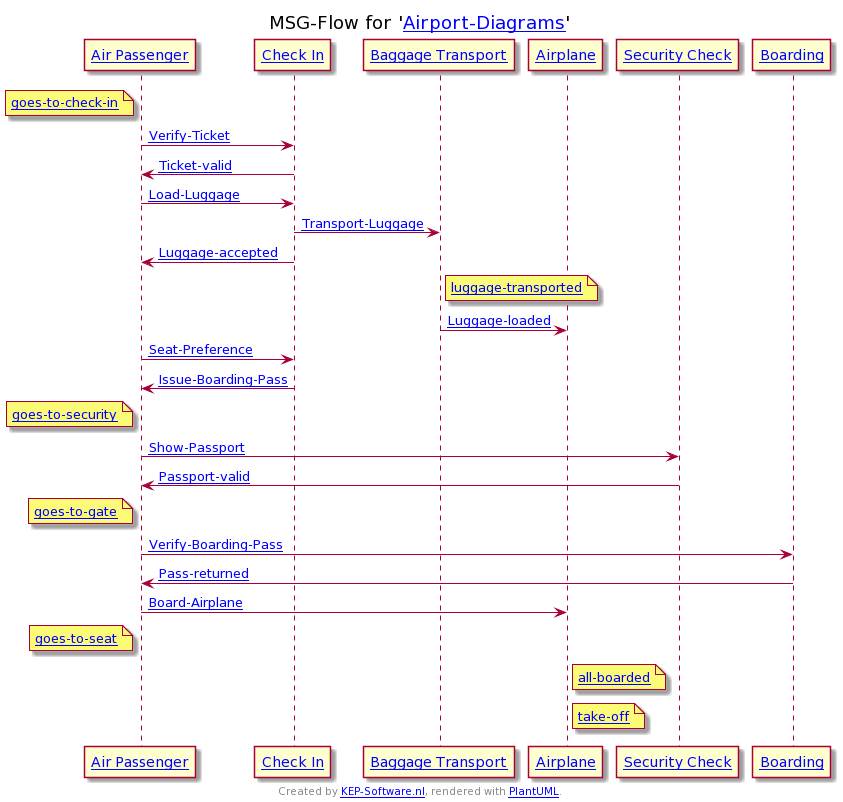
The passenger arrives at the airport and had a very smooth procedure to enter the airplane. At the check-in desk he successfully gave his ticket. The single luggage he had was accepted, not over weight nor odd size...
Goto Example - Passenger Boards AirplaneCreate your own flow
With the button below you can start creating your own flow. Select a starting point from the given overview...
Lets start creating your own flowQuery Entities
Follow the link below to query the entities used in the Versatile example.
Goto Entities - VersatileKnowledge Base
The idea behind the product knowledge base is to couple the message flow with additional information stored in the database. The more data is available the more relations it can show. Be aware the created example are only as good as the information.
Learn more about the Knowledge BaseDesign Message Diagrams
This website was created as an interface to the Product Knowledge Base (PKB) specifically on the Message Diagrams part. The PKB is much more than just a message creator. It can store many (related) objecst and query its information (e.g. see the entities). The PKB is acting as a server which gets its information from XML files and stores this in memory. Each example has its own server running. The server is written in C and communicates with multiple clients over TCP/IP. The client is written in C (but also a Python and Python asyncio version are created). The main website is written in bash (CGI, HTML, CSS) and uses the client to query the PKB. The bash script parses the information to HTML The website runs under Apache using ExecCGI.
Sudoku Solver
This website will help you to understand and solve sudokus. In the game page you will be able to enter the sudoku as far as you know it. Click the button below to go to the start and explanation page.
Goto start pageStart Page
The start page give som simple information on the Sudoku Solver. Don't forget to use the mouse to hover over the notes/possibilities.
Goto start pageStart new Game
Start a new empty game. Use the mouse to select a field and then fill in the number. Every change will recalculate the possible next moves.
Lets start a new gameExample Game
The example game is partly filled, it already shows the notes an possibilities. Don't forget to move the mouse over the notes and possibilities you can also click on an existing number. Use the show/hide options to see the available options per cell. Click on a possibility to quickly fill in the cell.
Lets view an example gameDesign
The game functionality is build within a Python package with the intention that it can be used by others. The web interface is built with Python, Jinja2 and Flask which implemented routes so that the JavaScript can use Ajax to post the moves/changes. The layout is HTML and CSS. JavaScript is used to highlight the cells upon hovering over notes/possibilities and selecting filled fields. The web server runs under Apache using modwsgi. Each game has an unique hash which stores the information in memory, therefore it is only kept for 24 hours. This was a project to show the possibility of the Sudoku helper less time was spent on the look and feel of website (notes/possibilities)
How to get in contact
You can get in contact by sending your message to
E-mail: info@kep-software.nl
Attachments
Attachments
Attachments
Attachments
Attachments
Attachments
Attachments
Attachments
Attachments
Attachments
Attachments
Attachments
Attachments
Attachments